Teaching Modulanner where your hitbox zones are
HITBOXES TAB
Modulanner draws nothing on your page. Your template artwork provides the zones, and you tell Modulanner where they are. That mapping is what the Hitboxes tab is for, and it is the first tab you see when you open the panel.
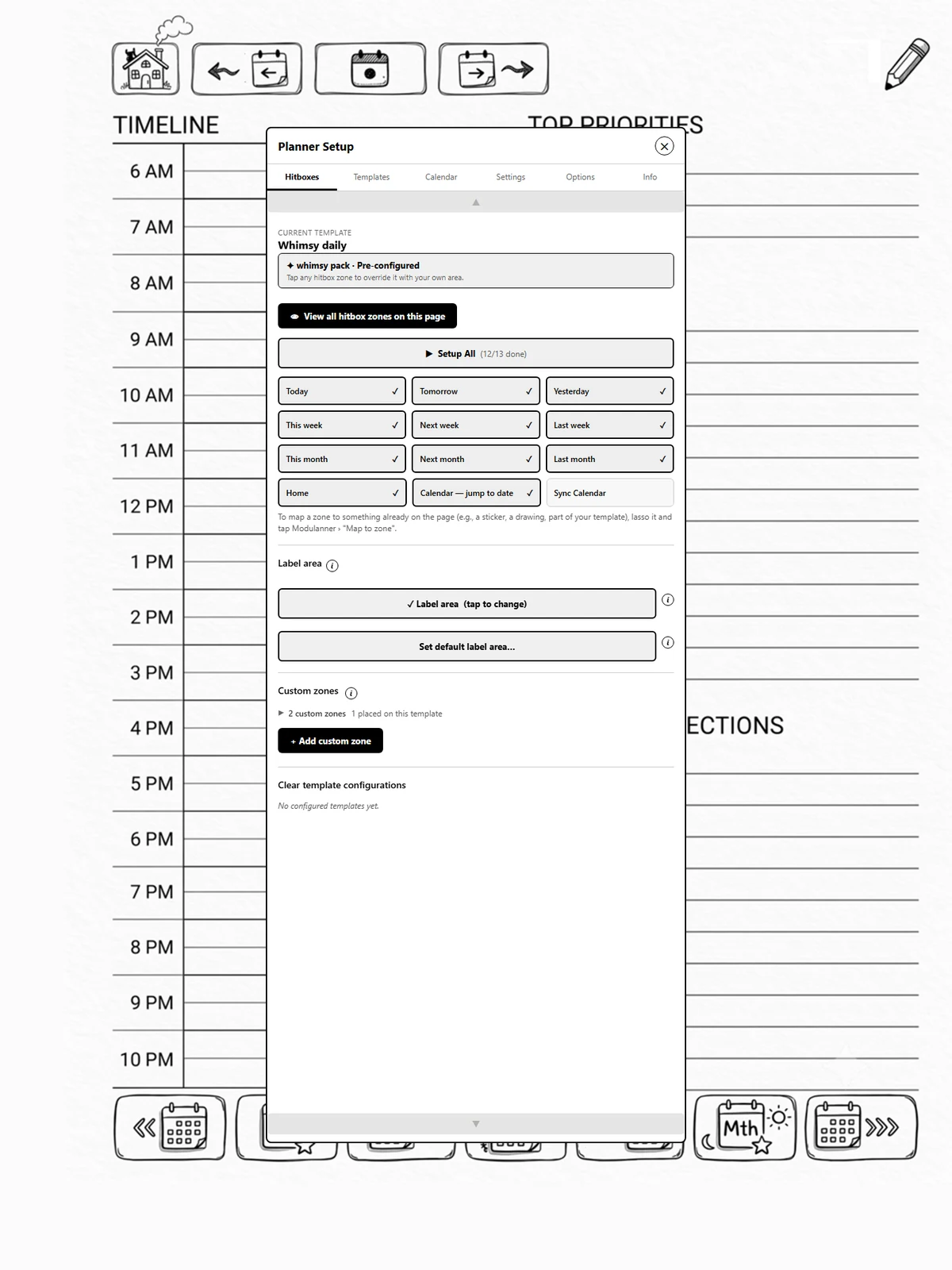
Sections
-
Current template: the template of the page you are on. If it came from a pack, a banner says so and every zone is already placed.
-
View all hitbox zones on this page: draws every region over the page so you can check your work, and lets you nudge any of them (page 1.5).
-
Setup All: walks you through every zone in order (page 1.3).
-
The zone grid: the ten navigation zones, plus Calendar, jump to date and Sync Calendar. Tap one to map it. A tick means it is placed.
-
Label area: where the date is written on each new page (page 2.7).
-
Custom zones: zones you define yourself (Part 2).
-
Clear template configurations: start a template over (page 4.6).
Tip
Mapping is per template. A layout you set up for your daily page does not carry over to your weekly one, because each has its own artwork.
Already have artwork on the page?
Lasso a sticker, a drawing, or part of your printed template and tap Map to button from the Modulanner lasso button. The artwork itself becomes the tap area, with no corners to draw. See page 1.11.